Samantha J Walker

Digital Photography Tips and Reviews

  • Home
  • About Me
  • Contact Me

How to Set Up and Maximize Your Adobe Stock Account: A Complete Guide

November 30, 2024 By Shane Russell

Looking to monetize your creative work or access millions of high-quality assets? An Adobe Stock account opens up exciting opportunities for both content creators and buyers. Whether you’re a photographer, illustrator, or designer, this platform lets you showcase your work to a global audience while earning passive income.

With an Adobe Stock account, you’ll gain access to a vast marketplace of royalty-free images, videos, templates, and 3D assets. The platform seamlessly integrates with Adobe Creative Cloud applications, making it incredibly convenient to license and use assets directly in your projects. Plus, you’ll benefit from Adobe’s trusted reputation and robust search capabilities that help your content reach the right audience.

What Is Adobe Stock and How It Works

Adobe Stock is a premium digital marketplace that connects content creators with buyers seeking high-quality creative assets. The platform operates as a subscription-based service integrated within Adobe’s Creative Cloud ecosystem.

Key Features and Benefits

  • Direct Creative Cloud Integration: Access Adobe Stock assets directly within Photoshop, Illustrator or InDesign interfaces
  • AI-Powered Search: Find specific assets using visual search algorithms filters for color shape tone
  • Premium Content Library: Browse over 200 million professional-grade assets including photos vectors illustrations
  • Multi-Device Access: Download manage assets across desktop mobile web platforms
  • Built-in Preview Tools: Test watermarked versions before purchasing final assets
  • Regular Content Updates: Access thousands of new assets added daily by global contributors
License Type Usage Rights Price Range
Standard Basic digital web print usage $29.99/month (10 assets)
Enhanced Extended distribution rights $79.99/month (25 assets)
Extended Unlimited reproduction rights Custom pricing
Enterprise Custom team solutions Volume-based rates
  • Standard License: Covers common digital web print marketing materials social media posts
  • Enhanced License: Includes merchandise templates resale products unlimited impressions
  • Extended License: Permits unlimited print runs broadcast rights resale products
  • Enterprise License: Offers custom terms team collaboration features asset sharing

Creating Your Adobe Stock Account

Setting up an Adobe Stock account provides access to millions of high-quality creative assets. The registration process integrates seamlessly with existing Adobe accounts for Creative Cloud users.

Step-By-Step Registration Process

  1. Navigate to Adobe Stock’s official website
  2. Click the “Create Account” button in the top right corner
  3. Select between “Individual” or “Enterprise” account options
  4. Enter your email address or sign in with your existing Adobe ID
  5. Fill in your personal information including name payment details
  6. Choose your preferred subscription plan
  7. Accept the terms of service license agreement
  • Valid email address for account confirmation
  • Government-issued photo ID for contributor accounts
  • Active payment method (credit card debit card or PayPal)
  • Phone number for two-factor authentication setup
  • Tax information for content contributors
  • Completed W-8 or W-9 forms for U.S. residents selling content
Account Type Requirements Verification Time
Basic Buyer Email + Payment Instant
Contributor Email + ID + Tax Info 24-72 hours
Enterprise Business Email + Company Details 1-2 business days

Managing Your Adobe Stock Subscription

Adobe Stock account management provides flexible control over your subscription settings, payment options, and usage tracking. The platform offers multiple subscription tiers to match your creative needs and budget.

Subscription Plans and Pricing

Adobe Stock features tiered subscription plans that accommodate different usage requirements:

Plan Type Monthly Assets Monthly Price Annual Price
Basic 10 images $29.99 $239.88
Standard 40 images $79.99 $719.88
Premium 350 images $169.99 $1,559.88
Enterprise Custom Custom Custom

Each plan includes:

  • Rollover of unused downloads for up to 12 months
  • Access to standard assets
  • Integration with Creative Cloud apps
  • Commercial usage rights
  • Instant cancellation options

Payment Methods and Billing

Adobe Stock accepts multiple secure payment options for subscription management:

  • Credit cards (Visa, MasterCard, American Express)
  • PayPal accounts
  • Wire transfers (Enterprise accounts)
  • Purchase orders (Enterprise accounts)

Billing features include:

  • Automated monthly or annual payments
  • Detailed usage reports
  • Tax invoice generation
  • Email notifications for payment processing
  • Subscription renewal alerts
  • Currency selection based on region

Your billing cycle starts on the purchase date with automatic renewals enabled by default. Modify these settings through your Adobe account dashboard for complete payment control.

Using Your Adobe Stock Account

Your Adobe Stock account provides access to millions of creative assets through an intuitive interface integrated with Adobe Creative Cloud applications.

Browsing and Downloading Assets

The Adobe Stock interface displays curated collections organized by categories themes types. Here’s how to navigate:

  • Filter results by media type resolution orientation or price range
  • Preview assets in full resolution before purchasing
  • Save favorite items to themed collections for quick access
  • Download watermarked comps to test assets in your projects
  • Access advanced search tools powered by Adobe Sensei AI
  • Sort results by relevance popularity or recent additions
  • View detailed license history for each downloaded asset
  • Check remaining downloads in your subscription plan
  • Access licensing certificates for commercial use
  • Transfer licenses between team members
  • Monitor usage rights expiration dates
  • Download proof of license documentation
  • Generate reports of asset usage across projects
License Type Downloads per Month Price Range
Basic 10 assets $29.99
Standard 40 assets $79.99
Premium 350 assets $199.99
Enterprise Custom Custom

Account Security and Settings

Adobe Stock account security features protect your creative assets and payment information through multiple authentication layers and encrypted data storage.

Password Protection Best Practices

Your Adobe Stock account password requires specific criteria for maximum security:

  • Create passwords with at least 12 characters including uppercase letters numbers special characters
  • Enable two-factor authentication through the Adobe ID security settings
  • Change passwords every 90 days to maintain account integrity
  • Avoid using identical passwords across multiple Adobe services
  • Set up security questions with unique answers for additional protection

Account Recovery Options

Adobe Stock provides multiple account recovery methods to regain access:

  • Reset passwords through the verified email address linked to your Adobe Stock account
  • Use the automated phone verification system to confirm identity
  • Access recovery codes generated during two-factor authentication setup
  • Contact Adobe Support with government-issued ID for manual verification
  • Restore account access through trusted devices previously used to log in

The security settings remain accessible through your Adobe account dashboard allowing instant modifications to protection levels based on your preferences.

Conclusion

An Adobe Stock account opens up a world of creative possibilities whether you’re a content creator or buyer. It’s more than just a digital asset marketplace – it’s a comprehensive platform that streamlines your creative workflow through seamless integration with Adobe Creative Cloud.

With robust security features flexible subscription options and an AI-powered search system you’ll find exactly what you need while keeping your assets and information safe. The platform’s user-friendly interface and varied licensing options ensure you can focus on what matters most: bringing your creative vision to life.

Starting your Adobe Stock journey is straightforward and the benefits are clear – from monetizing your work to accessing millions of high-quality assets. It’s an investment that pays dividends in both time saved and creative potential realized.


iStock Pricing Guide 2024: Complete Cost Breakdown for Photos & Videos

November 24, 2024 By Shane Russell

I’ve been diving deep into the world of stock photography lately and I’m thrilled to share my insights about iStock’s pricing structure. As someone who regularly uses stock photos for various projects I know how crucial it’s to find the right balance between quality and cost.

When I first discovered iStock I was amazed by their flexible pricing options that cater to different needs and budgets. Whether you’re a solo content creator or running a large marketing team there’s something for everyone. I’ll walk you through everything from credit packs to subscription plans so you can make the best choice for your creative projects.

What Is iStock and How Does It Work

iStock is a leading digital content marketplace owned by Getty Images that provides high-quality stock photos, videos, illustrations, and audio files. I’ve found that it operates on a straightforward system where content creators upload their work, and customers like me can purchase and download these assets for various projects.

Key Features of iStock Platform

  • Advanced search filters to locate specific content by color, orientation or composition
  • Multi-language interface supporting 21 different languages
  • AI-powered search technology for finding visually similar images
  • Built-in image editor for basic photo modifications
  • Curated collections organized by themes, styles or industries
  • Mobile app for browsing and downloading on-the-go
  • Cloud storage integration for saved content
  • Download history tracking for easy content management

Stock Photo Licensing Types

I’ve discovered that iStock offers two primary licensing options:

  • Standard License
  • Use in digital media up to 500,000 impressions
  • Print reproduction up to 500,000 copies
  • Social media and website usage
  • No resale or redistribution rights
  • Extended License
  • Unlimited digital impressions
  • Unlimited print runs
  • Merchandise creation and resale rights
  • Electronic template usage rights
  • Free promotional distribution

Unlike some stock photo websites like Shutterstock, iStock’s licensing structure provides clear usage guidelines without complex restrictions. Each image displays its available license types directly on the preview page, making it simple to determine the appropriate usage rights for specific projects.

Understanding iStock Credit Pricing System

I’ve discovered that iStock’s credit-based pricing system offers flexible purchasing options for digital content. Credits serve as the platform’s virtual currency, enabling users to download images, videos, and illustrations at varying costs based on file size and collection type.

Credit Pack Options and Rates

The iStock credit system features multiple pack sizes, starting from 1 credit at $12 up to 300 credits at $2,400. Here’s a breakdown of the current credit pack options:

Credit Pack Size Total Cost Cost per Credit
1 credit $12 $12.00
6 credits $60 $10.00
12 credits $120 $10.00
30 credits $280 $9.33
60 credits $520 $8.67
300 credits $2,400 $8.00

Essential collection images cost 1 credit each, while Signature collection images require 3 credits per download. Video downloads range from 6 to 18 credits depending on quality and collection type.

Subscription vs. Credit Purchase

I’ve analyzed both purchasing options and found distinct advantages for different usage patterns:

Credit Packs:

  • Perfect for occasional downloads
  • No expiration date on purchased credits
  • Ideal for mixing content types (photos, videos, vectors)
  • Freedom to purchase premium collection items
  • Cost-effective for frequent downloads
  • Monthly download limits with automatic renewal
  • Better value than competing stock photo websites like Shutterstock for high-volume users
  • Limited to specific content types per plan
  • Access to Essential collection only

iStock Price Comparison with Competitors

I’ve analyzed iStock’s pricing against other major stock photo websites to provide a comprehensive market comparison. The platform’s competitive positioning reveals distinct advantages for specific user segments.

Benefits of iStock Premium

iStock Premium collection offers superior quality visuals at competitive rates compared to Shutterstock’s Premium tier. Through my extensive research, I’ve found that iStock’s Premium content delivers:

  • Exclusive access to high-resolution images from Getty Images contributors
  • Monthly credits rollover for up to 12 months
  • Advanced AI-powered search filters
  • Unlimited seats for team subscriptions
  • Integration with major design software

Cost-Effectiveness Analysis

My detailed price comparison between iStock and other stock photo websites reveals significant insights:

Platform Basic Monthly Plan Premium Monthly Plan Single Image Cost
iStock $29 $99 $12
Shutterstock $29 $159 $9.16

The cost analysis demonstrates:

  • Lower Premium tier pricing than Shutterstock for team subscriptions
  • Flexible credit system with bulk purchase discounts
  • Multi-asset downloading options within subscription plans
  • Higher value per download for Premium collection access
  • Competitive rates for extended licenses compared to market alternatives
  • Marketing agencies requiring Premium content
  • Small businesses with consistent visual content needs
  • Creative professionals seeking exclusive imagery
  • Teams collaborating on multiple projects simultaneously

Tips for Getting the Best Value on iStock

I’ve discovered several effective strategies to maximize value when purchasing iStock content. These methods help reduce costs while maintaining access to high-quality assets.

Seasonal Discounts and Promotions

iStock offers significant savings through seasonal promotions during major holidays like Black Friday Cyber Monday Memorial Day. I’ve tracked these promotional periods carefully:

  • Subscribe to iStock’s newsletter to receive early notifications of flash sales offering up to 25% off credit packs
  • Follow iStock’s social media channels for exclusive promo codes distributed monthly
  • Take advantage of first-time customer discounts providing 15% off initial purchases
  • Monitor special events like iStock’s anniversary sale featuring limited-time pricing on Premium content
  • Buy larger credit packs to reduce per-credit costs from $12 to $8
  • Purchase annual subscriptions instead of monthly plans for 20% savings
  • Combine team licenses to access volume pricing discounts of 15-30%
  • Stack promotional codes with bulk purchases during sales events
  • Choose Premium collection credits in larger quantities to maximize per-image value
Credit Pack Size Cost Per Credit Savings vs. Single Credits
1 Credit $12.00 0%
60 Credits $9.50 21%
300 Credits $8.00 33%

Maximizing Your iStock Investment

I’m thrilled to share my proven strategies for getting the most value from iStock’s digital content marketplace. Let me show you how to optimize your purchasing decisions and maximize your investment.

Smart Download Strategies

  • Download similar images in bulk to utilize the same credit value within a 24-hour window
  • Schedule downloads during off-peak hours to take advantage of flash sales
  • Track seasonal content needs to purchase during promotional periods
  • Save favorite images to collections before buying to plan credit usage efficiently
  • Download lower-resolution versions when high-resolution isn’t required
  • Check file specifications before purchasing to avoid unnecessary credit spending
Plan Type Best For Key Benefits
Credit Packs Occasional users No expiration, flexible usage
Monthly Subscription Regular downloads Lower per-image cost
Annual Subscription High-volume users 20% savings vs monthly
Team Subscription Marketing agencies Shared download limits
  • Select credit packs for one-time projects requiring specific Premium content
  • Choose monthly subscriptions when downloading 10+ images consistently
  • Opt for annual plans to secure better rates on long-term projects
  • Consider team subscriptions to share resources across multiple users
  • Mix subscription types to access both Essential and Premium collections efficiently
  • Compare per-download costs between iStock and Shutterstock before committing

Conclusion

I’m thrilled to have shared my deep dive into iStock’s pricing structure! It’s amazing to see how their flexible options can fit any creative budget or business need. From credit packs to subscriptions the platform offers incredible value especially when you know the right strategies.

My research clearly shows that iStock stands out with its premium collection quality competitive rates and user-friendly licensing. I’ve found their credit system particularly appealing since it lets me control my spending while accessing top-tier content.

So whether you’re a solo creator or part of a large team I’m confident you’ll find the perfect pricing plan on iStock. I can’t wait for you to explore these amazing options and take your projects to the next level!


Stay Under Budget with iStock Promo Codes

August 20, 2015 By Shane Russell

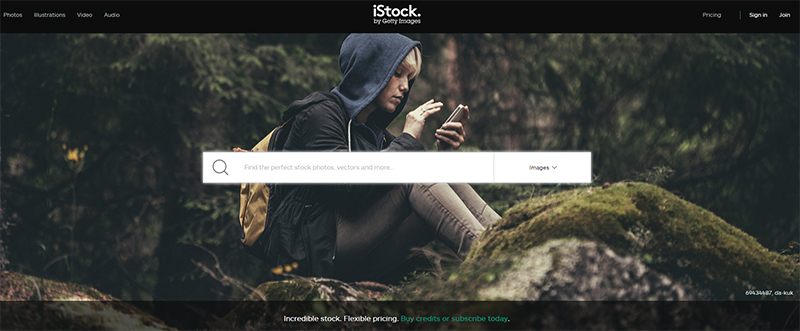
istock promo code

Stock image photo services are not always the cheapest item on your list when it comes to marketing expenses. They are one of the most essential, making any stock photo image subscription one of your primary investments and an integral part of your marketing plan.

Not everybody has the luxury of spending a couple hundred dollars per month on these images. In fact, some will of the best advice anyone can give you when it comes to marketing brand-new businesses is to not spend money before you make money. Although that situation may be ideal, it is not always possible. For many people, their marketing budgets must be strictly adhered to.

It is these people that I’m trying to reach today. There are those who have limited marketing budgets – I know because I used to be one of them. In a very real sense, I still am as my marketing expenses are always on a budget. Although stock photos are an essential part of any marketing plan, there are ways to stay under budget.

The monthly pricing model for most stock photo imaging services often leaves business owners with limited marketing budgets feeling pressured to purchase and download images before a subscription runs out. This can lead to unplanned, hasty decisions. As a fellow business owner myself, I can understand firsthand the danger of making a marketing decision without thinking of where it first. Every business owner goes into business with a plan and making unplanned decisions are never in that plan.

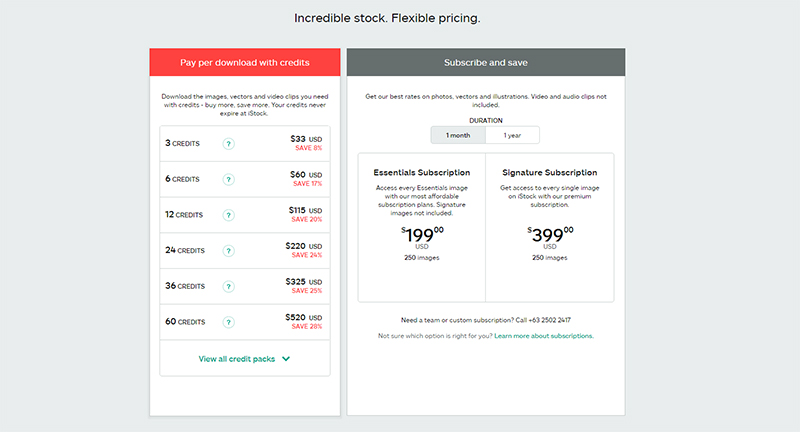
istock-flexible-pricinng

If you have a strict marketing budget, a flexible pricing plan might be best for you. Instead of paying monthly for a certain amount of images, it might be better if you were to purchase credits. The pricing model for iStock photo’s imaging service allows you to do just that. Instead of paying a monthly fee, these do not expire. This is the best business model to follow if you don’t need several of images every month. What if you only need an image every other month? This is an excellent way to start.

If you wanted to have even more room in your budget, consider the exclusive relationships that Stock Photo Secrets maintains with various stock image photo sites. Stock Photo Secrets runs various promotions for several of the market’s stock photo imaging services. iStock promo codes for 2025, as offered by Stock Photo Secrets, enable new users to receive discounts on credit packs up to 15% off. Every business maintains a marketing budget, as no business is in the business of wasting money that can otherwise be saved.

Recent Posts

  • The Power of Stock Footage for Real Estate Drone Videos
  • 7 Essential Interior Design Principles: Transform Your Space Like a Pro
  • How to Set Up and Maximize Your Adobe Stock Account: A Complete Guide
  • WordPress Photo Management: 7 Essential Tips for Better Image Optimization
  • iStock Pricing Guide 2024: Complete Cost Breakdown for Photos & Videos
  • How to Create Stunning Photo Collages with Pic Collage App: A Complete Guide
  • Add Words to Your WordPress Photo
  • Which Getty Images Footage License Should You Get?
  • Choosing Cheap Stock Photos that Support your Message and Elicit Visceral Response
  • Photocase Photography: An Overview of Interestingness
  • Stay Under Budget with iStock Promo Codes
  • Is Adobe Stock Something for my Business?

Photocase Overview

Follow Me!

Make sure to follow me on my social media for updates, tips, reviews and many more.
Follow Us on FacebookFollow Us on Google+Follow Us on TwitterFollow Us on LinkedInFollow Us on InstagramFollow Us on PinterestFollow Us on YouTube

My Site’s Policies

  • Disclaimer
  • Privacy Policy
  • Terms of Use

Copyright © 2026 · Samantha J Walker · All Rights Reserved